How to make an AI cartoon: the AI made a 72-second cartoon with a plot
The test was run in Russian: the requests and the AI's answers are translated here, and the screenshots show the Russian interface.
We tested how to make an AI cartoon from a written description. In the Yenisei app, the AI made the cartoon "The Fox Cub and the Fallen Star": nine scenes, three characters, lines in Russian, and a story with a beginning, challenges, and a resolution. The cartoon runs 72 seconds. Generating and stitching took 23 minutes and 72 credits.
Making an AI cartoon from text: story first
A cartoon that's just one pretty scene rarely gets watched to the end. For viewers to stay until the end, the hero needs a goal, obstacles, and a deed. We wrote out the story scene by scene before generating anything:
| Scene | What happens | Line (in Russian) | What the scene is for |
|---|---|---|---|
| 1 | The fox cub sees a star fall from the sky | "A star fell!" | Setup |
| 2 | Finds a crying little star in the forest | "Don't cry. I'll take you home" | The hero's goal |
| 3 | Comes to a wide river; there's no bridge | "How are we going to get across?" | First obstacle |
| 4 | A beaver pushes a log over | "Hop on, I'll give you a ride!" | A helper |
| 5 | They float across the river; the little star glows | "How beautiful!" | A breather |
| 6 | At the mountain, the little star starts to fade | "Hold on! We're almost there!" | Danger |
| 7 | The fox cub gives the little star his scarf | "Take it. It's warm" | The hero's deed |
| 8 | The little star flies off into the sky wrapped in the scarf | "Fly home!" | Resolution |
| 9 | The new star winks at the fox cub; another one falls from the sky | "Good night" | Ending and a hook for a sequel |
The key scene here is the seventh. The fox cub gives away the only thing he has, and after that the viewer waits to see how it all ends.
First message: style, rules, and characters
In the first message, we described the whole cartoon and the first scene:
We're making the cartoon "The Fox Cub and the Fallen Star": 3D animation, like a family animated film, 16:9 format. It has nine scenes of 8 seconds each; I'll send them one at a time. Rules for all scenes: generate right away, without asking for confirmation and without questions afterward; generate each scene from the text description only, with no reference and without relying on earlier clips; sound: only sound effects and voices, no music; lines in Russian, in children's voices. Characters. Fox cub: red, with big eyes, a white-tipped tail, and a blue knitted scarf. Little star: a small yellow five-pointed star with round eyes, the size of an apple, glowing. Scene 1, 16:9, 8 seconds: night, an autumn forest, a starry sky. The fox cub sits on a stump and looks at the sky. One star breaks loose and falls behind the trees in a shower of sparks. The fox cub jumps up and gasps: "A star fell!" Sound: night forest, crickets, the whistle of the falling star, the fox cub's voice.
A minute later, the first scene was in the conversation.
A cartoon made with AI: one scene at a time
After that, we sent one scene at a time and repeated the style, the format, and the characters' features in each one. Here's the seventh:
Scene 7, 16:9, 8 seconds, from the description only, no reference, no music, the same 3D animation. Night, a mountaintop above the clouds, strong wind, a sky full of stars. A red fox cub with big eyes and a white-tipped tail stands on the summit. He takes his blue knitted scarf off his neck and gently wraps a small, dim yellow star with closed eyes in it. The fox cub says quietly: "Take it. It's warm." The little star opens its eyes and starts to glow brighter. Close-up. Sound: wind, the fox cub's voice, a soft chime growing louder.
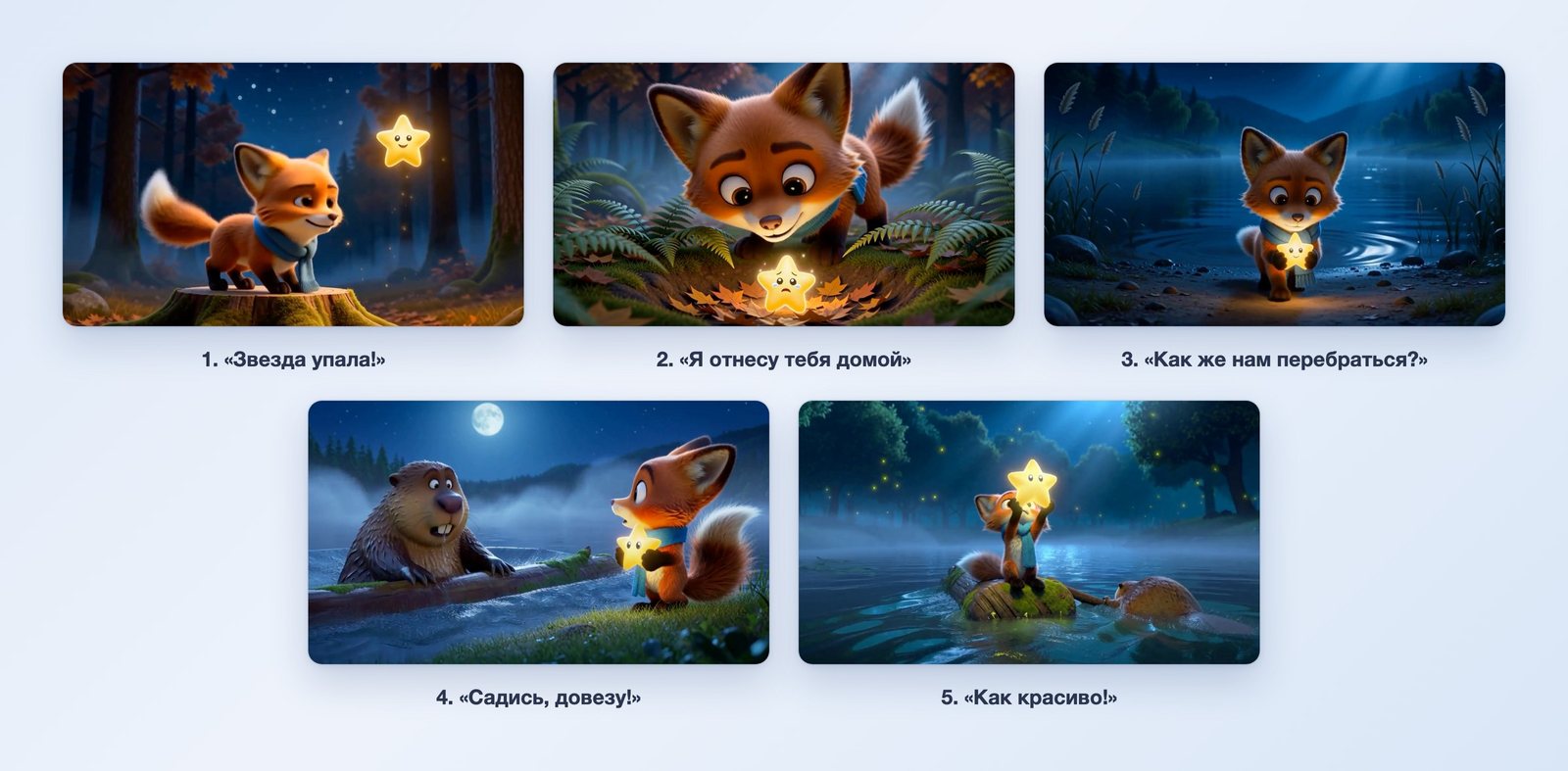
After the ninth scene, the AI summarized the cartoon in a table on its own: scene, format, length, and main event.
To stitch the scenes together, we sent one sentence:
Stitch the nine scenes together, in order, into one cartoon.
The AI joins up to six scenes at a time. So the stitching took three steps: scenes 7–9, scenes 1–6, then both parts. At each step, we replied with the word "continue."
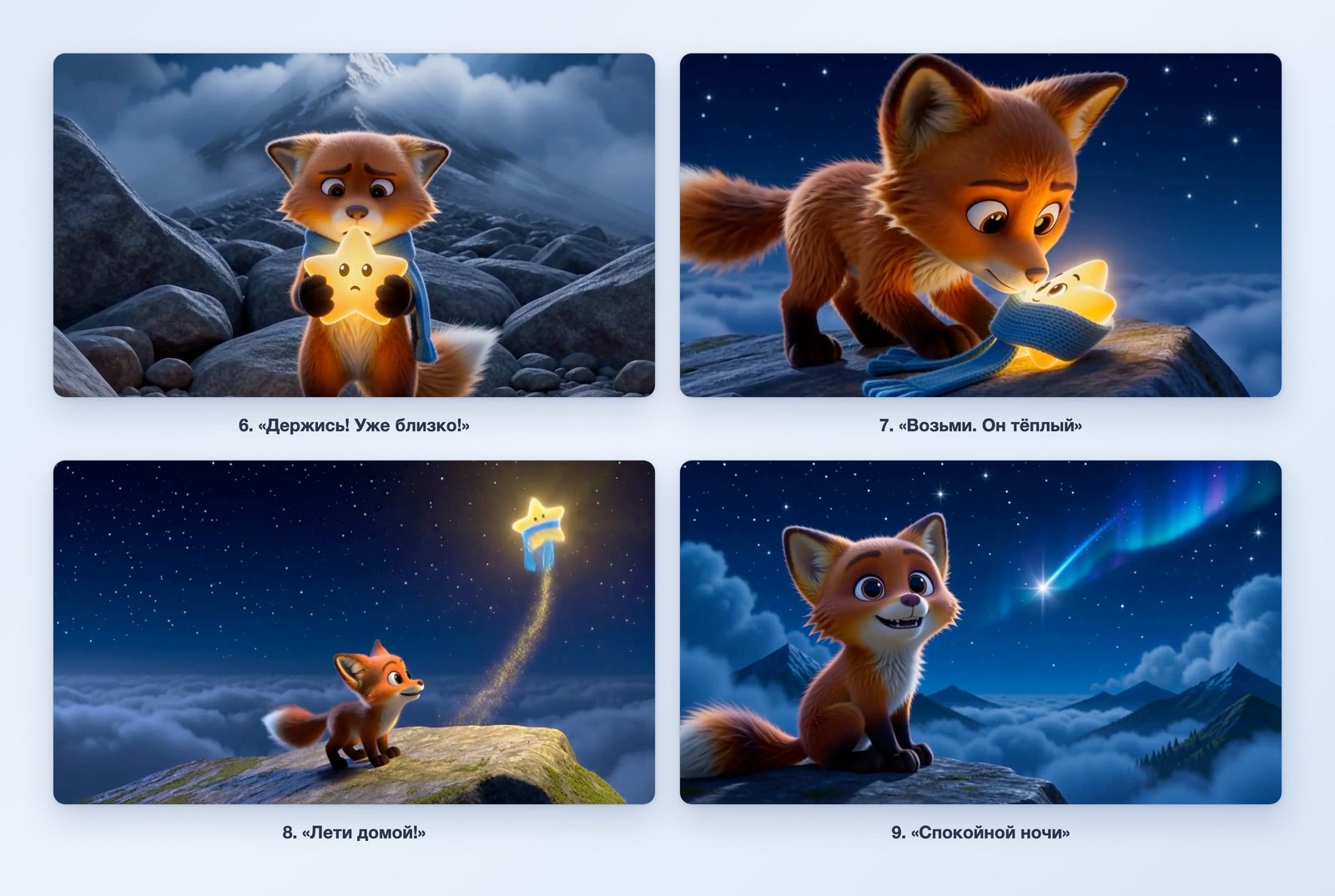
What we got
The cartoon runs 72.8 seconds, with a frame size of 1344×768 pixels. All nine scenes are there, in order.
We checked the characters against frames from each scene:
| Feature | Scenes | Matches |
|---|---|---|
| Fox cub: red, big eyes, white-tipped tail | all nine | yes |
| Blue scarf on the fox cub | 1–6 | yes |
| Scarf on the little star, fox cub without a scarf | 8, 9 | yes |
| Little star: yellow, with round eyes, glowing | 1–8 | yes |
| Beaver: brown, with big teeth | 4, 5 | yes |
The scarf went through the whole story the way we wrote it: first it's on the fox cub, in the seventh scene he takes it off, and in the eighth the scarf flies away with the little star.
What the cartoon cost
One second of video costs one credit. Stitching doesn't use credits.
| What we did | Cost |
|---|---|
| Nine scenes of 8 seconds each | 72 credits |
| Three stitching steps | 0 |
| The whole 72-second cartoon | 72 credits |
Making a cartoon with AI in a different style: hand-drawn
The same method works for hand-drawn animation. Here, one scene was enough:
Now a different cartoon, hand-drawn, in the spirit of old flat 2D animation with outlines and a watercolor background. A gray cat in an astronaut's spacesuit sits on the Moon, looks at the Earth, and says in Russian, in a child's voice: "From here, my home looks so tiny!" Then it waves its paw at the Earth. 16:9, 8 seconds, quiet space music.
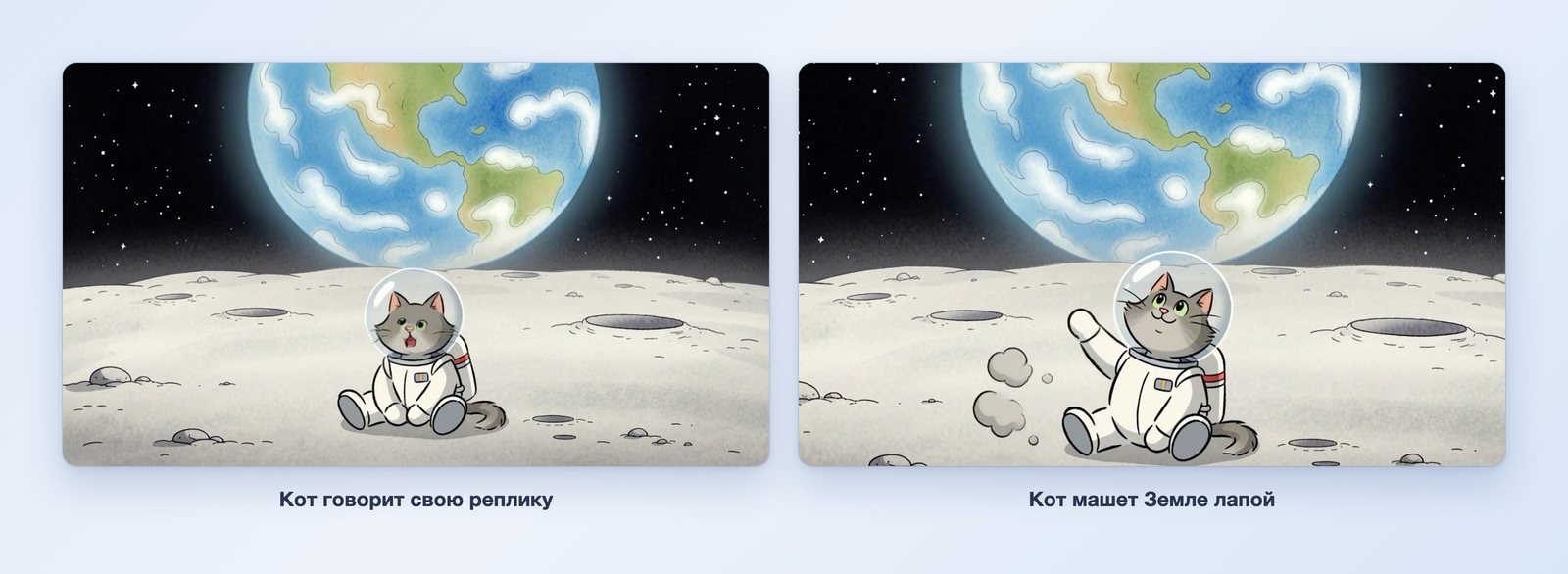
The style is different: a flat picture with outlines, a watercolor Earth, hand-drawn craters. The cat says its line in Russian and waves its paw at the end.
What to keep in mind
- One scene per response, up to 8 seconds. A one-minute cartoon takes eight or nine messages plus stitching.
- Every scene needs the style and the characters' features. We repeated them word for word, and the characters stayed the same.
- It's better to generate scenes without music. Each scene gets its own music, and you can hear jumps where the scenes meet. We generated the scenes with sound effects and voices, and laid one tune over the whole cartoon separately, after stitching: Chat has no option for that.
- The words "from the description only, no reference" are needed. A scene generated with an earlier clip as a sample starts with that clip's sound.
- The AI decides small details on its own. In the first scene, the star doesn't disappear behind the trees; it hovers next to the fox cub.
- The frame is 768 pixels on the short side. That's enough for social media and for watching on a phone.
What to put in your request to get a cartoon
- Style: 3D animation, hand-drawn, clay, watercolor.
- Characters: who they are, what color, what they wear, what features they have.
- Story: the hero's goal, two obstacles, a deed, and a resolution.
- Scene: one action and one short line in quotation marks.
- Format and length: 16:9 or 9:16, up to 8 seconds.
- Sound: sound effects and voices.
Where to use AI for cartoons
AI for cartoons is available in two places, and they work the same way.
- The Yenisei Agent app for Windows, macOS, and Linux, in the «Чаты» ("Chats") section. We made the cartoon here: the conversation, the scenes, and the downloaded clips sit in one window on your computer.
- Yenisei Chat in the browser — if you'd rather not install the app.
No VPN required.
We showed Reels, ads, and photos brought to life in the AI video generator article. The AI for series article covers how an episode that's hard to stop watching is built.
Which to choose
- A cartoon with a story, on your own computer — Yenisei Agent, the Chats section: write out the story scene by scene and generate the scenes one after another in a single conversation.
- The same without installing anything — Yenisei Chat in the browser. You don't need both.
- A short cartoon for a greeting — one scene from a description, like the cat on the Moon.
Try it on your own task
The agent works in the app for Windows, macOS and Linux. Sign in with your email and a code from the message; the basic plan is free.