AI for series: the AI shot a 72-second episode with a hook at the end
The test was run in Russian: the requests and the AI's answers are translated here, and the screenshots show the Russian interface.
We tested AI for series: in Yenisei Chat, we shot the first episode of a vertical mini-drama, "The New Owner." The episode has nine scenes, two characters, lines spoken in Russian and a plot with a twist. It runs 72 seconds and cuts off on a question that will be answered in the next episode. Shooting and stitching took about 22 minutes and 72 credits.
Why more and more people are watching AI series
Vertical mini-series with episodes one to two minutes long have become a genre of their own within a few years. According to Sensor Tower, viewers around the world spent 3.8 billion hours watching them in the first quarter of 2026.
An episode like this used to take actors, a camera operator and a set. With AI, one person shoots it in an evening, so more and more AI series are showing up in feeds. Interest in how to make them is growing too: the query "AI for series" (in Russian) is typed into Yandex about 3,500 times a month, and "how to create an AI series" another 1,700.
How an AI series works: the mechanics of one episode
AI for series shoots the scenes, but it's the plot that holds the viewer. A vertical mini-series is watched in a feed, in between other videos. An episode has three seconds to keep the viewer from scrolling past, and its final second to make them want the next one. That's why an episode is first mapped out technique by technique, and only then shot.
Here is how our episode is built (the lines are spoken in Russian):
| Second | Technique | What's on screen | What the viewer thinks |
|---|---|---|---|
| 0 | Conflict with no lead-in | The manager shouts in front of the guests: "You're fired! Get out of here!" | What happened? |
| 8 | Promise | The waitress takes off her apron: "You'll regret this" | How will she do it? |
| 16 | Challenge | The manager smirks: "Who do you think you are?" | If only someone would answer him |
| 24 | Mystery | A driver opens the car door for her: "Good evening, Marina Sergeyevna" | So who is she? |
| 32 | Decision | In the car, on the phone: "We're buying this restaurant. Today" | Here it comes |
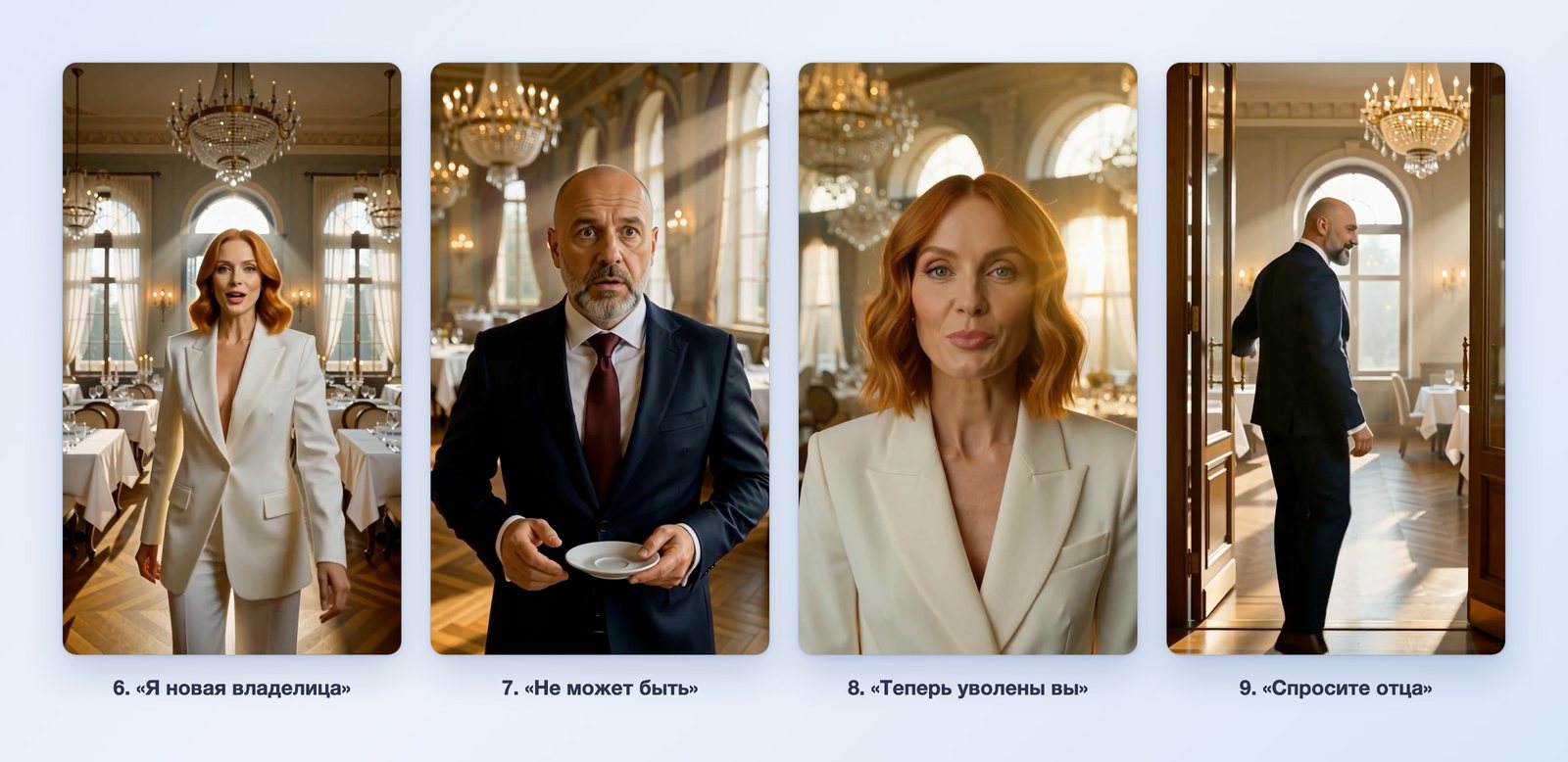
| 40 | Twist | In the morning she walks in wearing a white suit: "I'm the new owner" | The promise is being kept |
| 48 | Reaction | The manager drops his cup: "It can't be" | Justice |
| 56 | Payback | "Now you're the one who's fired" | Full circle |
| 64 | Cliffhanger question | He turns around in the doorway: "Ask your father who he owes" | What about her father? |
How the series gets the viewer hooked
There are only a few techniques, and each one can be named.
- The episode opens with a conflict. There is no intro sequence, no title and no introduction of the characters at the start. The first sound in the episode is a shout.
- Injustice in the first scene. The heroine is humiliated in front of people. The viewer takes her side before learning her name.
- A promise that has to be kept. After the words "You'll regret this," the viewer waits for the payback and keeps watching until it comes.
- A question in the middle. The driver addresses the waitress formally, by her first name and patronymic. There's no answer yet, and it's already hard to leave.
- The weak one turns out to be strong. This is the genre's main twist: the viewer gets what they've wanted since the first scene.
- A mirrored line. "You're fired" at the start and "Now you're the one who's fired" at the end. The viewer hears the echo and feels that the story has come together.
- A cliffhanger on a new question. The episode answers one question ("who is she?") and raises another ("what about her father?"). The next episode will start with the answer and end with a new question.
- One scene is one action and one line. Every eight seconds the location, the framing or the balance of power changes. The lines are short, up to six words.
Yenisei will write the script and the scene requests itself
You don't have to write the plot yourself, and you don't need to go elsewhere for ready-made prompts either. We tested this with a separate request in the same app:
I want to shoot a vertical mini-series for social media. Come up with a plot for a one-minute first episode: an office, a female intern and a department head. It needs a conflict in the first scene, a twist and a cliffhanger question at the end. Then write ready-made requests for shooting each of the nine 8-second scenes: 9:16 format, the characters' identifying features in every scene, one line in Russian of up to six words, sound without music. Don't shoot the scenes yet, just the text.
In under two minutes, the AI sent back an episode called "The Report": Lena, an intern, is made to redo a report that she wrote herself, and her name has been erased from it. The answer had everything needed for the shoot:
- the plot scene by scene: conflict from the first second, the twist in scene five, the cliffhanger question in scene nine;
- the identifying features of the three characters and a description of the office, to be repeated in every scene;
- for each scene, the action, the line, the sound and the ready-made text of the request;
- a setup for the second episode;
- the same script as a separate file.
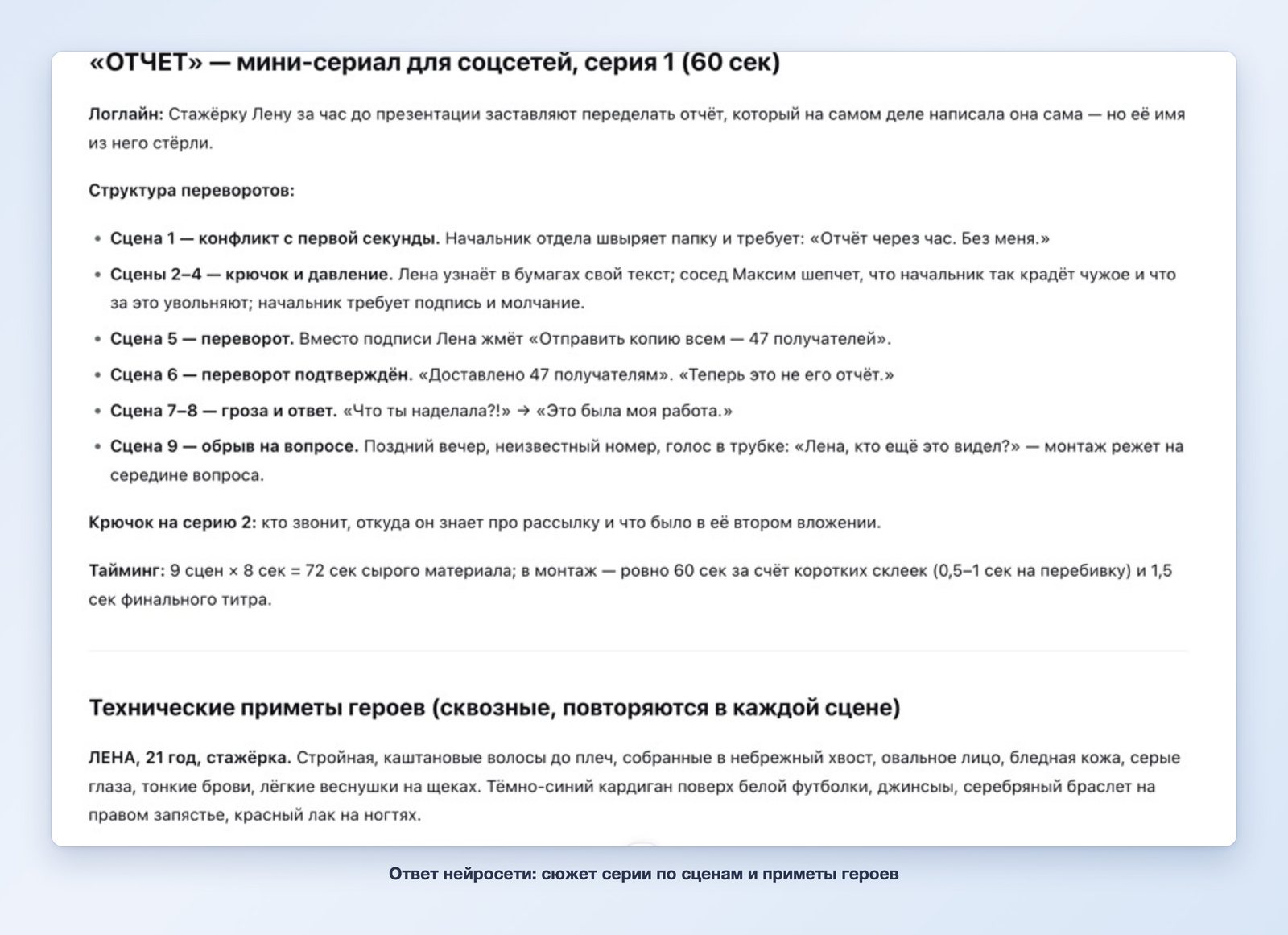
Then you send these requests one at a time into the same conversation. The plot, the prompts, the shooting and the stitching are all in one window.
How to create an AI series: the first message
In the first message we described the series, the shooting rules, the characters, the location and the first scene:
We're shooting a vertical mini-series, "The New Owner," for social media: 9:16 format, cinematic drama, warm light. Episode 1 is nine 8-second scenes, and I'll send them one at a time. Rules for all scenes: shoot right away, with no confirmation and no questions afterward; shoot each scene from the text description only, with no reference and without relying on earlier clips; sound is ambient noise and voices only, no music; lines in Russian. Characters. Marina, 27: wavy shoulder-length red hair, green eyes; at the start she is a waitress in a black blouse and a white apron. Viktor, the restaurant manager, 45: bald, short gray beard, dark blue suit, burgundy tie. Location: an upscale restaurant with chandeliers and white tablecloths. Scene 1, 9:16, 8 seconds: evening, a full dining room. In front of the guests, Viktor angrily shouts at Marina and points to the door: "You're fired! Get out of here!" Marina stands in front of him with a tray, and the guests turn around. Medium shot, both in frame. Sound: the hum of the room dies down, Viktor's voice.
A minute later, the first scene was in the conversation.
How to make an AI series scene by scene
After that we sent one scene at a time. In each one we repeated the format, the character's identifying features and the location:
Scene 4, 9:16, 8 seconds, from the description only, no reference, no music. A street at night by the entrance to an upscale restaurant, rain, wet asphalt, lights. Marina, 27: wavy shoulder-length red hair, green eyes, black blouse, no apron, walks out the door. A black executive car is parked at the curb. An elderly driver in a black suit and a peaked cap opens an umbrella over her, opens the rear door and says respectfully in Russian: "Good evening, Marina Sergeyevna." Medium shot, both of them and the car in frame. Sound: rain, the pop of the umbrella opening, the driver's voice.
Scene 6, 9:16, 8 seconds, from the description only, no reference, no music. Morning, the same upscale restaurant with chandeliers and white tablecloths, the dining room is empty, the sun is shining through the windows. The tall doors swing open and Marina walks in: 27, wavy shoulder-length red hair, green eyes, now in a white pantsuit. She walks confidently between the tables toward the camera, stops and says calmly in Russian: "Good morning. I'm the new owner." Sound: the click of heels on the parquet floor, her voice.
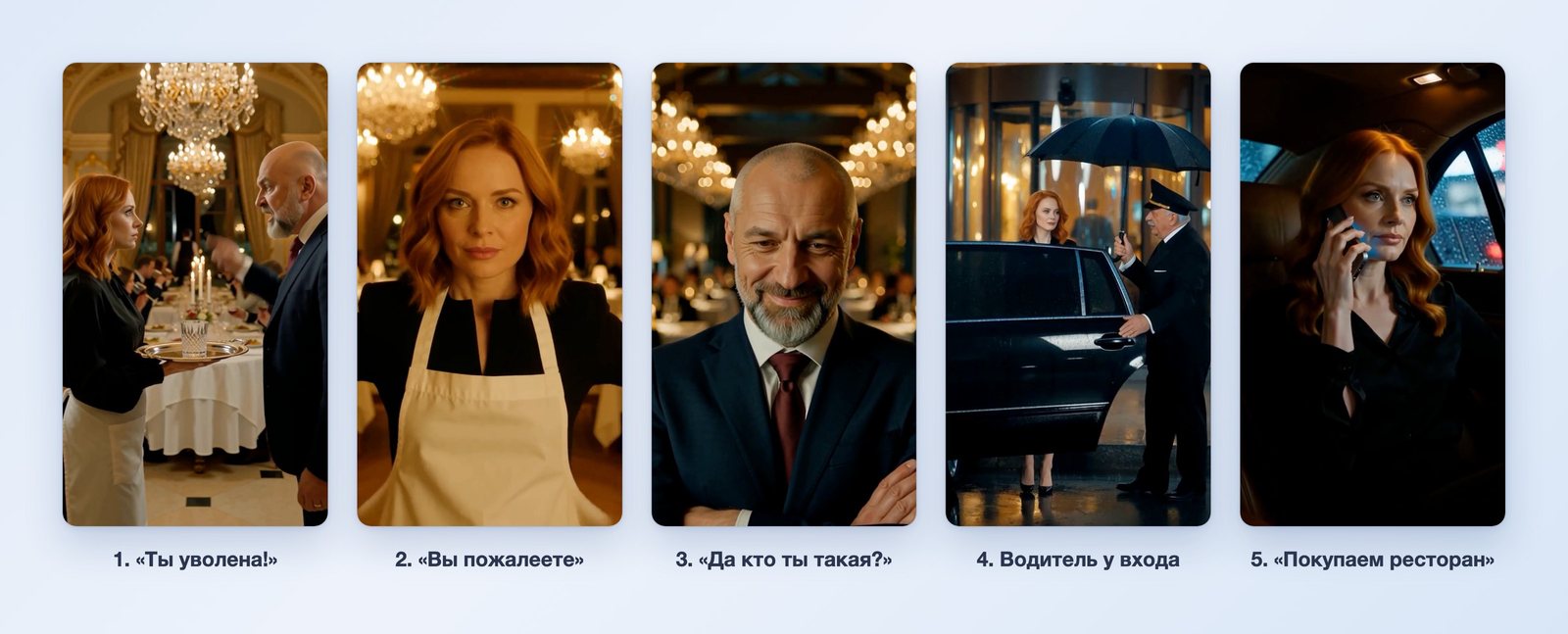
After the ninth scene, the AI summed up the episode in a table on its own: scene number, content, length and format.
Stitching the episode together
We asked it to stitch the scenes together with a single sentence:
Stitch the nine scenes together in order into one video: this is episode 1.
The stitching took three steps. The AI joins up to six scenes at a time, so it first stitched scenes 1–6, then 7–9, then the two parts. At each step we replied with the word "next."
Series made with AI: how it turned out
The episode runs 72.8 seconds, and the frame is vertical, 768×1344 pixels. All nine scenes are in place and in order.
We checked the characters against frames from every scene:
| Identifying feature | Scenes where the character is in frame | Matches |
|---|---|---|
| Marina: wavy shoulder-length red hair | 1, 2, 4, 5, 6, 8 | in all of them |
| Marina: black blouse and white apron | 1, 2 | yes |
| Marina: white pantsuit | 6, 8 | yes |
| Viktor: bald, short gray beard | 1, 3, 7, 9 | in all of them |
| Viktor: dark blue suit, burgundy tie | 1, 3, 7, 9 | in all of them |
Text was the only reference for each scene. The faces and clothes stay consistent thanks to the description, which we repeated word for word.
How much the episode cost
One second of video costs one credit. Stitching scenes together doesn't use any credits.
| What we did | Cost |
|---|---|
| Nine 8-second scenes | 72 credits |
| Three stitching steps | 0 |
| The whole 72-second episode | 72 credits |
It took 22 minutes: about a minute to shoot each scene, and the rest was our messages and the stitching.
Music in the episode
We shot the scenes without music: only ambient noise and voices. If you ask for music in every scene, it comes out different each time, and you can hear the jumps where the scenes join.
We added a single background track for the whole episode separately, after the stitching. There is no such option in Chat.
What to keep in mind
- The format and the characters' identifying features are needed in every scene. In a trial episode we left out "9:16" once and got a horizontal scene.
- A scene modeled on an earlier clip starts with that clip's sound. In a trial episode we wrote "the same characters and the same location," the AI took the earlier clip as its reference, and three scenes in a row started with the same opening. The words "from the description only, no reference" fix this.
- One scene per answer, up to 8 seconds. A one-minute episode means eight or nine messages plus the stitching.
- The line often comes at the end of the scene. By our measurements, in four of the nine scenes the character speaks in the last two seconds.
- Small details change. The dining room looks different in the evening and in the morning. In scene seven the cup falls, but the saucer stays in his hand.
- The frame is 768 pixels on the short side. That's enough for viewing on a phone.
What to write in the first message of a series
- Title, format and genre — once for the whole series.
- Shooting rules: scenes one at a time, shoot right away, from the description only, sound without music.
- Characters: age, hair, clothes and one striking feature. Red hair or a bald head with a gray beard is recognizable in any shot.
- Location: where the action takes place and what the light is like.
- First scene: a conflict and a line in quotation marks.
Where to create AI series
AI for creating series is available in two places, and they work the same way.
- The Yenisei Agent app for Windows, macOS and Linux, the «Чаты» ("Chats") section. This is where we shot the episode: it's more convenient. The conversation, the finished scenes and the downloaded videos are all in one window on your computer.
- Yenisei Chat in the browser, if you don't want to install an app.
All the scenes of one episode are shot in a single conversation. No VPN is required.
We showed reels and ad videos in the article AI video generator, and cartoons in the article How to make an AI cartoon.
What to choose
- A mini-series for social media on your own computer — Yenisei Agent, the Chats section: map out the episode technique by technique, describe the characters and shoot the scenes one by one in a single conversation.
- The same without installing anything — Yenisei Chat in the browser. There's no need to set up both.
- The next episode — start it with the answer to the question the previous one cut off on, and end it with a new question.
- An episode before publishing — watch it all the way through with the sound on: the lines, the format and the joins between scenes.
Try it on your own task
The agent works in the app for Windows, macOS and Linux. Sign in with your email and a code from the message; the basic plan is free.