AI for building apps: the AI built an iPhone app in 7 minutes
The test was run in Russian: the requests and the AI's answers are translated here, and the screenshots show the Russian interface.
We tested AI for building apps on a real task. Yenisei Agent wrote a habit tracker app for iPhone, built it on its own and launched it in the iPhone simulator. The first version was ready in 6 minutes 42 seconds. Then we asked for four changes in plain words, and the AI made them. We didn't need a programmer.
How to create an app with AI: One request
We worked on a Mac with Xcode, a free program from Apple; you can't build an iPhone app without it. It includes a simulator: an iPhone on the computer screen, where the app runs the same way it does on a phone. This was the request:
Make an iPhone app called "Habits" in SwiftUI. What it should have: a list of habits with a "done today" mark; a streak of consecutive days for each habit; adding a habit with a name, an icon and a color; swipe to delete; a "Statistics" tab with a chart for the week; data is saved between launches. On the first launch, show three habits as examples. The design should be clean, like an expensive app's, with a light and a dark theme. Build the app and run it in the simulator.
The AI wrote six files of code, almost a thousand lines, drew an app icon, built the app and launched it.
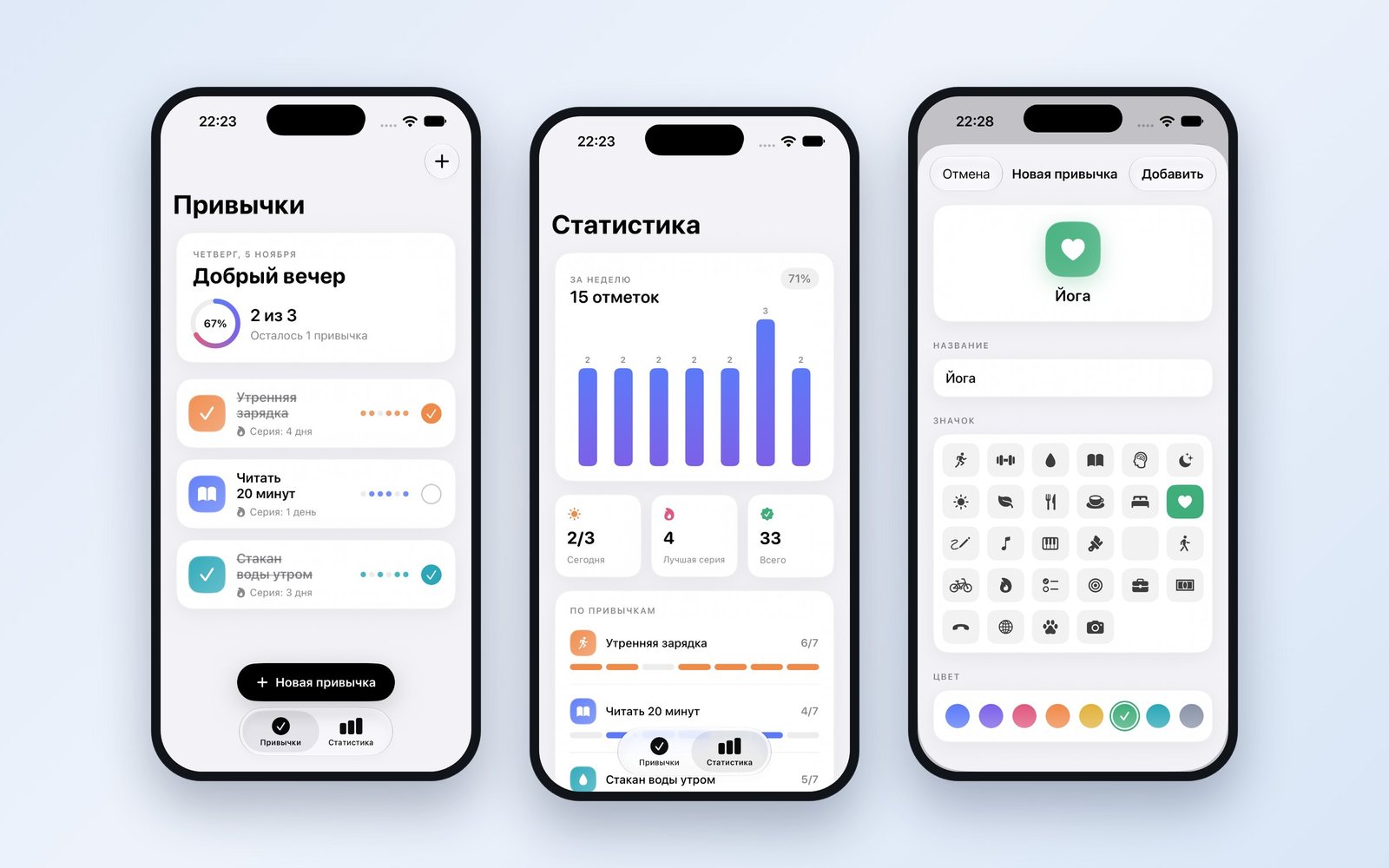
The app has three screens. The first is the list of habits: each one shows its streak of days and its marks for the week, and at the top there's a ring with the share completed today. The second has a chart for the week and a count for each habit. The third screen is the new habit form: a name, 28 icons and 8 colors.
The first build failed: one of the build tools didn't start. The AI found the cause on its own, picked the right setting and built the app again.
What we checked in the app
We checked the app ourselves, tapping the screen in the simulator:
| What we did | What we got |
|---|---|
| Removed the mark from a habit | the count changed from "3 of 3" to "2 of 3" and the streak got one day shorter |
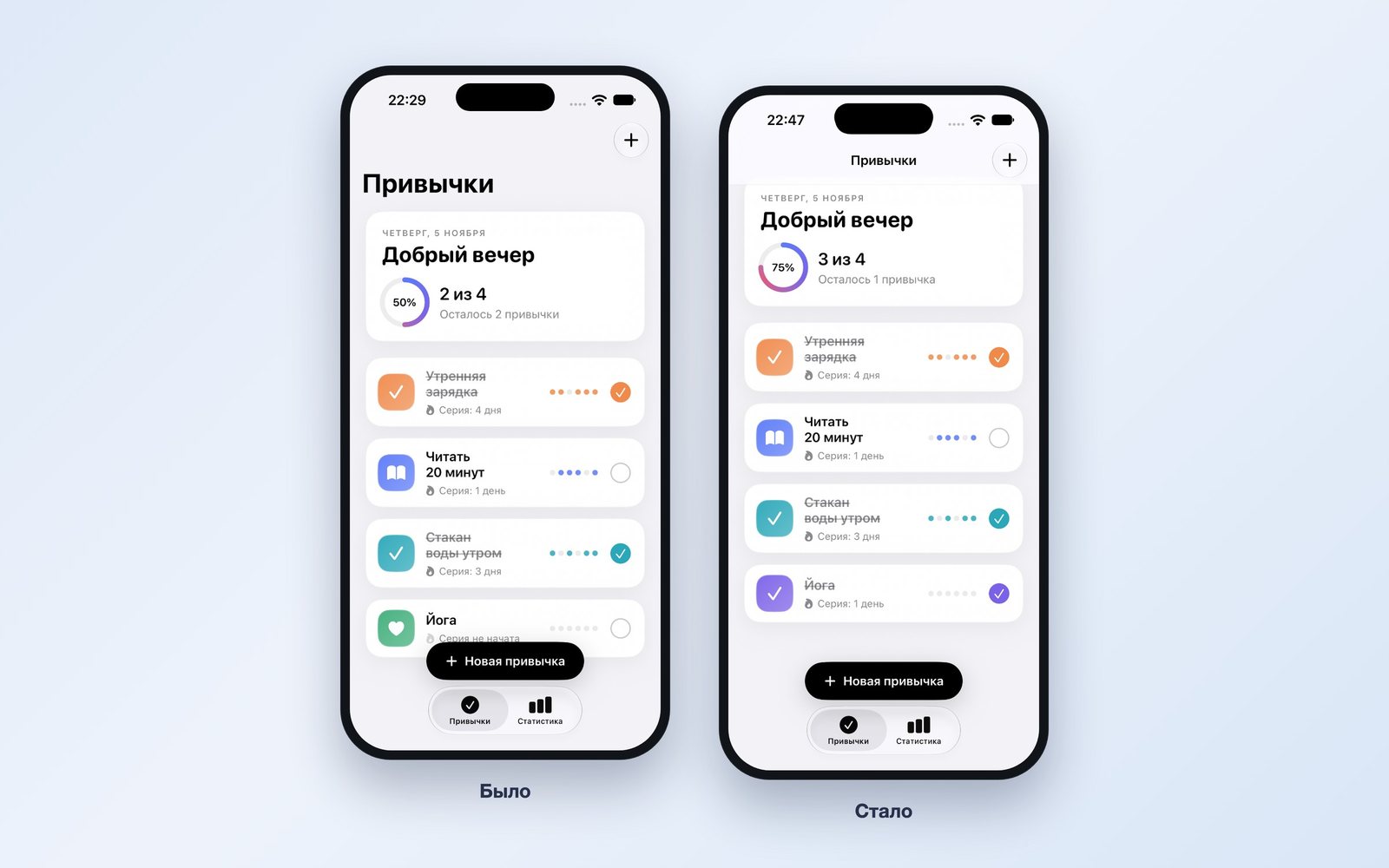
| Added a "Yoga" habit | the count became "2 of 4" and the ring showed 50% |
| Marked "Yoga" as done | "3 of 4" and 75%; the streak is 1 day |
| Closed the app and opened it again | the habits and marks are still there |
| Swiped a habit to the left and tapped «Удалить» ("Delete") | the habit disappeared and the count was recalculated |
| Added up the marks on the statistics screen | 6 + 4 + 5 = 15, which is the number shown; the 71% share is correct |
All six checks passed.
How to refine an app with AI
While checking, we noticed three flaws. The «Новая привычка» ("New habit") button covered the fourth habit in the list. One cell in the icon picker was empty. The chart had no days of the week under its bars. We listed them in a single request and added a new feature:
I've looked at the app, now improve it. 1) The "New habit" button covers the last habit in the list: make the list scroll above the button. 2) One cell in the icon picker is empty: replace that icon with one that exists. 3) Label the days of the week under the chart's bars. 4) Add editing: a long press on a habit opens the same form with its name, icon and color. The habits and marks already added must be kept.
After 13 minutes 29 seconds, the new version was in the simulator.
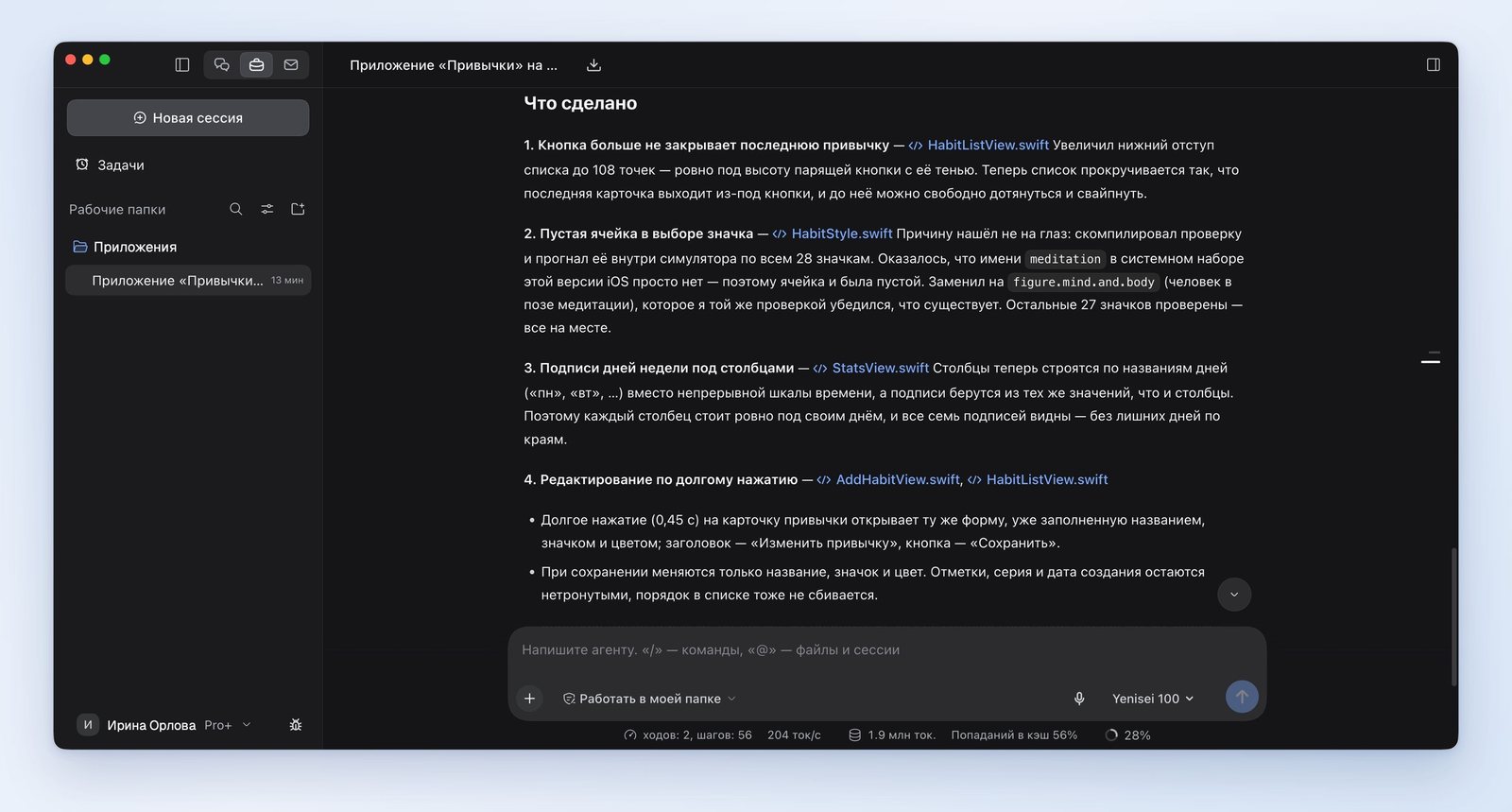
The AI looked for the cause of the empty icon by testing: it wrote a small program, ran it in the simulator and checked all 28 icons. One of them turned out to be missing from the phone's system, and the AI replaced it with a similar one.
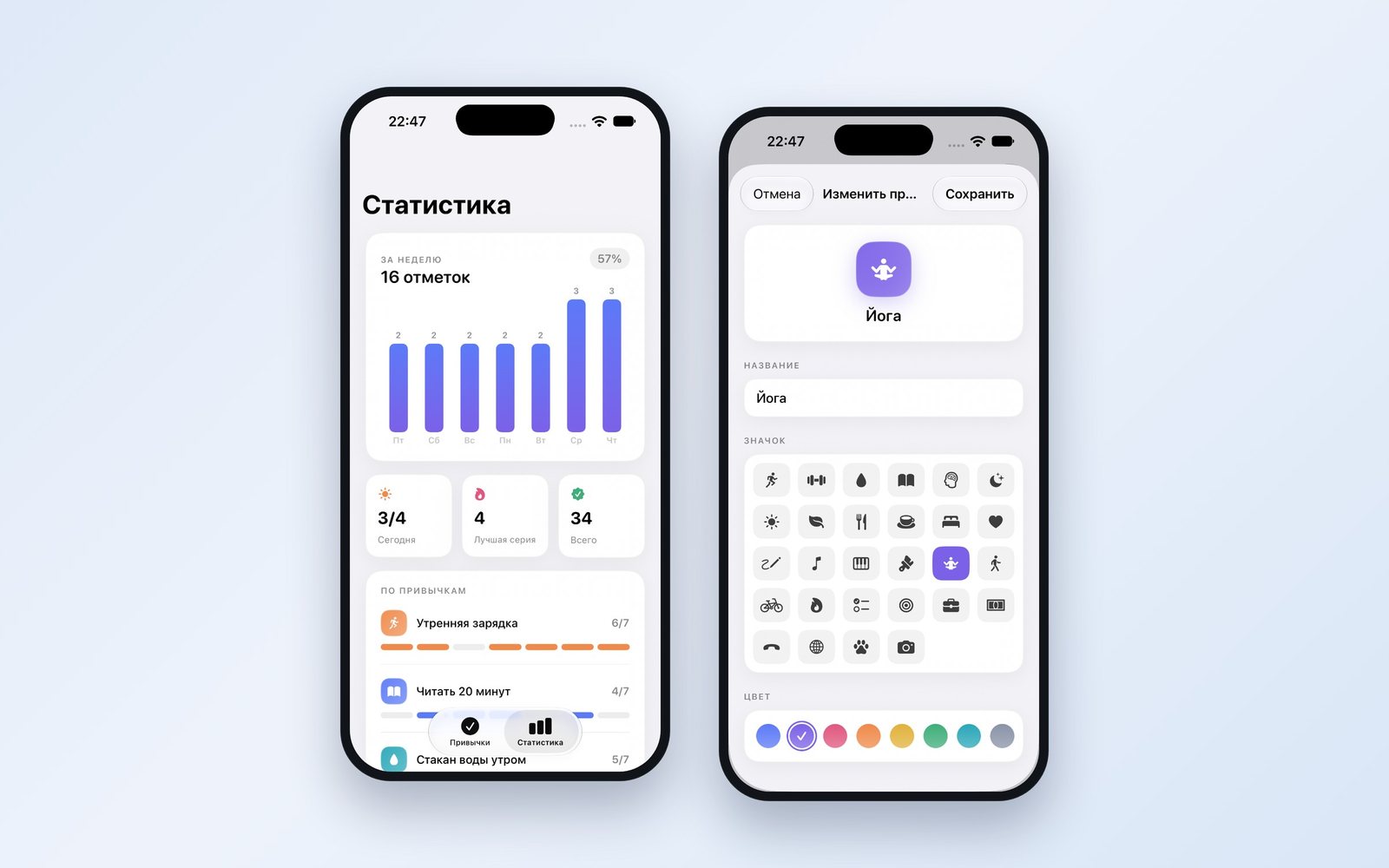
We checked all four changes. The list scrolls above the button, the empty cell is gone, and the days from Friday through Thursday are under the bars. A long press opens the form with the habit's details: we changed the icon and color for "Yoga" and the list updated. The habits and marks made in the first version were kept.
How to put the app on your own iPhone and publish it on the App Store
We asked the AI what it takes to get the app onto a real phone and into the store, and who does each step. It laid out twelve steps:
- On your own iPhone: five steps. The owner does the main ones: signing in to Xcode with their own Apple account, connecting the phone, running the app and confirming on the phone that the developer is trusted.
- On the App Store: seven steps. The owner signs up for a paid developer account, creates the app's page, uploads the build and submits it for review. The AI prepares the description and the text for the page, and if the reviewers send the app back, it goes through their comments and makes the fixes.
About Android, the AI said this: it's a separate version of the app written in a different language, and it requires Android Studio and a developer account on Google Play.
We didn't test these steps in practice. We didn't make an Android app either.
What still needs work
- The title of the edit form didn't fit: instead of «Изменить привычку» ("Edit habit") the screen shows «Изменить пр…» ("Edit ha…").
- A habit is deleted right away, with no "Are you sure you want to delete it?" prompt.
Both fixes can be requested the same way as the first four.
What to keep in mind
- An iPhone app requires a Mac with Xcode. An app like this can't be built on Windows or Linux.
- We asked the AI not to check its work with screenshots and looked at the app ourselves. We were the ones who found the three flaws.
- The app's data is stored on the phone itself. For the habits to show up on two devices, a separate request is needed.
- The AI filled in the sample habits for the first launch on its own: the names and the marks for past days.
Yenisei Agent or Yenisei CLI: which to use to build an app
These are two separate products, and you don't need to install both.
The Yenisei Agent app runs on Windows, macOS and Linux. It's for people who don't program: you describe the task in words, and the AI creates the files, builds the app and launches it on its own. Everything described in this article was done in it.
Yenisei CLI is an assistant for the terminal, designed for developers: you run it in the folder with the code, and it shows every change line by line and saves it in git. We showed how it works with code in the article "AI-assisted development".
Neither Yenisei Agent nor Yenisei CLI requires a VPN.
We showed how the AI makes a website and deploys it to a server in the article "AI for websites".
What to choose
- An iPhone app without a programmer — Yenisei Agent: describe the screens and features, get the app in the simulator and refine it in plain words.
- An app that already has code and a team — Yenisei CLI: changes are shown line by line and saved in git.
- Any app made by AI — go through all the screens yourself: add an entry, delete it, close the app and open it again.
Try it on your own task
The agent works in the app for Windows, macOS and Linux. Sign in with your email and a code from the message; the basic plan is free.