How to make a quiz with AI: it wrote 10 questions from a text in 45 seconds
The test was run in Russian: the requests and the AI's answers are translated here, and the screenshots show the Russian interface.
We tested how to make a quiz with AI from an existing text. We gave Yenisei a textbook section on the solar system and asked for 10 multiple-choice questions with an answer key. After 45 seconds, the quiz was in a Word file. All ten answers in the key are correct. Then the AI graded a student's work and made a second version of the quiz.
How AI writes a quiz from a text
The text of the section was about two thousand characters long and was in a plain text file. This was the request:
Read the file with the text of the section and write a quiz on it: 10 questions with four answer options each, one of them correct. Ask only about what is in the text. Give an answer key at the end. Save the quiz to a Word file.
The AI asked for permission to read the file and wrote the quiz. Here are two of the ten questions:
- Why is Venus the hottest planet? A) It is the closest to the Sun B) Because of its dense carbon dioxide atmosphere C) There are many volcanoes on its surface D) It is made of red-hot metal
- How long does light take to travel from the Sun to Earth? A) About 8 minutes 20 seconds B) About 1 minute C) About 1 hour D) About 24 hours
We checked the quiz against the text. The section has an answer to every question, and the key points to the correct option every time.
A quiz with AI: Grading a student's answers
Next we gave the AI a student's answers with two mistakes in them:
The student answered like this: 1-B, 2-A, 3-A, 4-B, 5-D, 6-B, 7-A, 8-C, 9-B, 10-C. Check them against the key, count the points and write what the student should review.
The AI found both mistakes: in the second question the student named Venus as the planet closest to the Sun, and in the fifth got the temperature on its surface wrong. It explained where the confusion might have come from and listed what to review: the order of the planets and the reason Venus is hotter than Mercury.
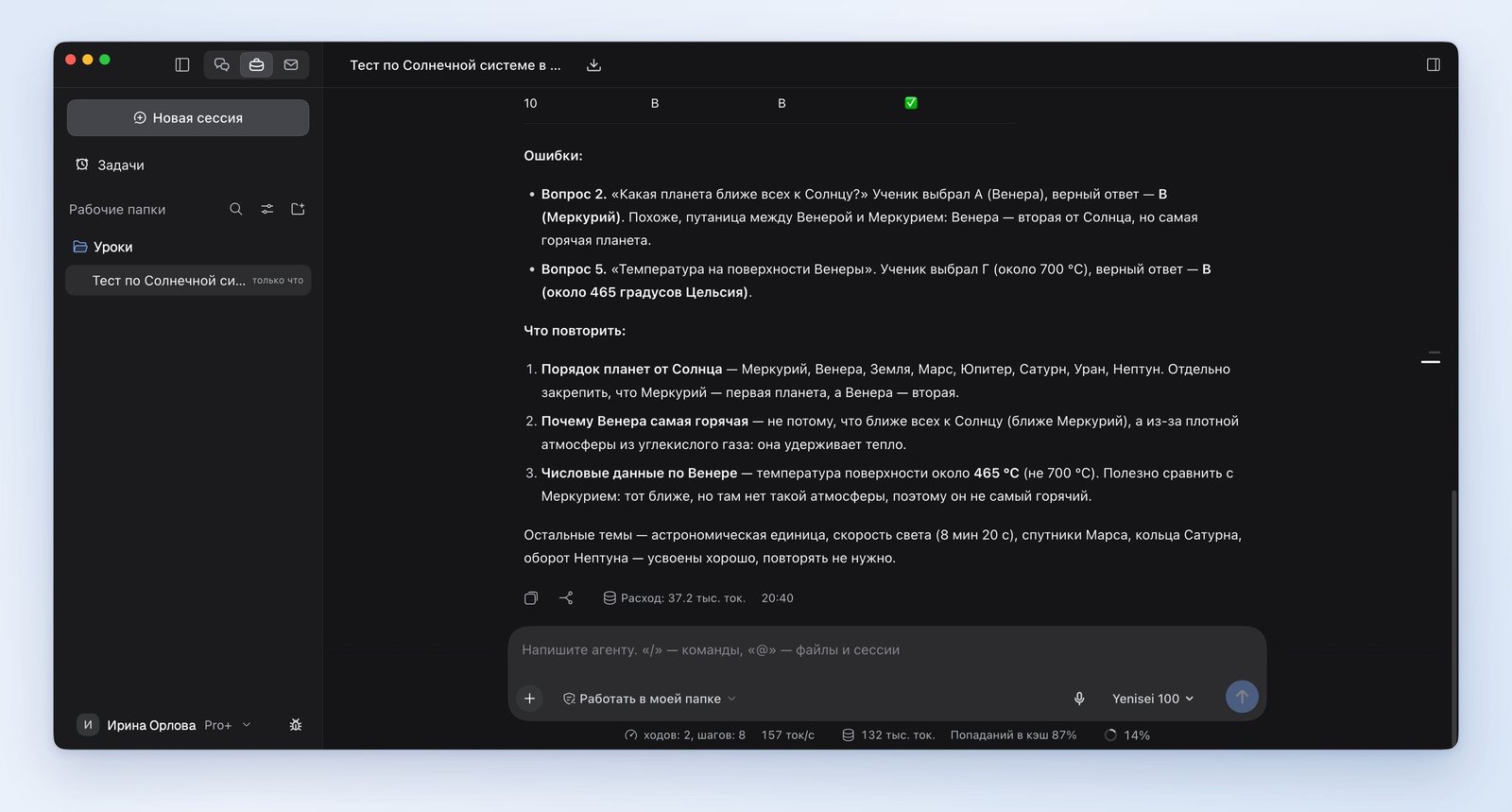
How to ask AI to write a second version of the quiz
In the first version we noticed a pattern: the correct answer was never under the letter D. We asked for this to be fixed:
In the key, the correct answer is never under the letter D. Make a second version of the quiz: the same questions in a different order, and shuffle the answer options so that the correct answer appears under every letter. As a separate Word file, with a key.
After 21 seconds, a second file appeared. The order of the questions in it is different, and the correct answers are distributed like this: A twice, B three times, C twice and D three times. We checked the second version's key with a program: all ten answers are correct.
Where the AI went wrong
In the first version, the correct answer was under the letters A, B and C and never under the letter D. An attentive student will notice this and won't pick the fourth option.
What to keep in mind
- The quiz didn't cover the whole text. It has no questions at all about the asteroid belt, the gas giants or Pluto. If you need questions on every part of the section, it's worth saying so in the request.
- The AI works only with the text it was given. It will carry any errors in the section itself over into the quiz.
Where AI for quizzes works
We did our testing in the Yenisei Agent app for Windows, macOS and Linux. It reads the text from a file and saves the quiz as a Word file in a folder on the computer. In Yenisei Chat you can paste the text of the section right into a message, with nothing to install. No VPN is required.
We showed how the AI prepares a lesson plan and a worksheet in the article "AI for teachers".
What to choose
- A quiz from a short text — the chat in your browser: paste the text into a message.
- A quiz from a file and several versions — Yenisei Agent. The versions are saved as separate Word files.
- A quiz that will go to the classroom — check the key against the text and look at which letters the correct answers are under.
Try it on your own task
The agent works in the app for Windows, macOS and Linux. Sign in with your email and a code from the message; the basic plan is free.